 Soltide
A more organised day,
focused on your priorities.
Your whole day, planned around what you have decided matters.
Why it exists
I kept bouncing
between two kinds of app.
One kind gave me real auto-scheduling and time blocking, and I loved seeing the day laid out. Sunsama is the best of them. It also asked me to keep buckets, breakdowns and categories in good order before it would help, and the week I stopped maintaining it was the week it stopped being worth the money.
The other kind was a list I could add to forever. TickTick does that well, and it is a fast way to reach Friday with sixty open items and no idea which one mattered on Tuesday. Structure was optional, so it never happened.
Tiimo got closest on the parts I cared about most. The focus timer and the routines are genuinely good. My tasks still ended up ungrouped, so the day never held together.
I wanted the visibility of a planner without the maintenance, and the satisfaction of a list without the pile.
the whole brief, reallySoltide is my attempt at the bridge. Enough structure that the day means something, few enough decisions that you can set it up once and get on with your life.
What it is
Being clear about
what this is not.
Plenty of good tools already exist in the two categories next door. Soltide is not trying to be either of them, and saying so up front saves everybody a download.
What Soltide is not
- Not a traditional todo list. An infinite inbox is the problem, not the feature.
- Not a time tracker. Nothing here bills an hour or reports on your output.
- Not project management. No sprints, no assignees, no status columns.
- Not a system you have to maintain to keep getting value from.
What Soltide is
- A daily planner that organises the day across every part of your life.
- Auto-scheduling that fits the rest of your day around what is already fixed in it.
- Grouped, structured tasks, so a day is a shape rather than a queue.
- A tool that adjusts to your real life, because things happen unexpectedly.
The day
Your day, already laid out
when you open it.
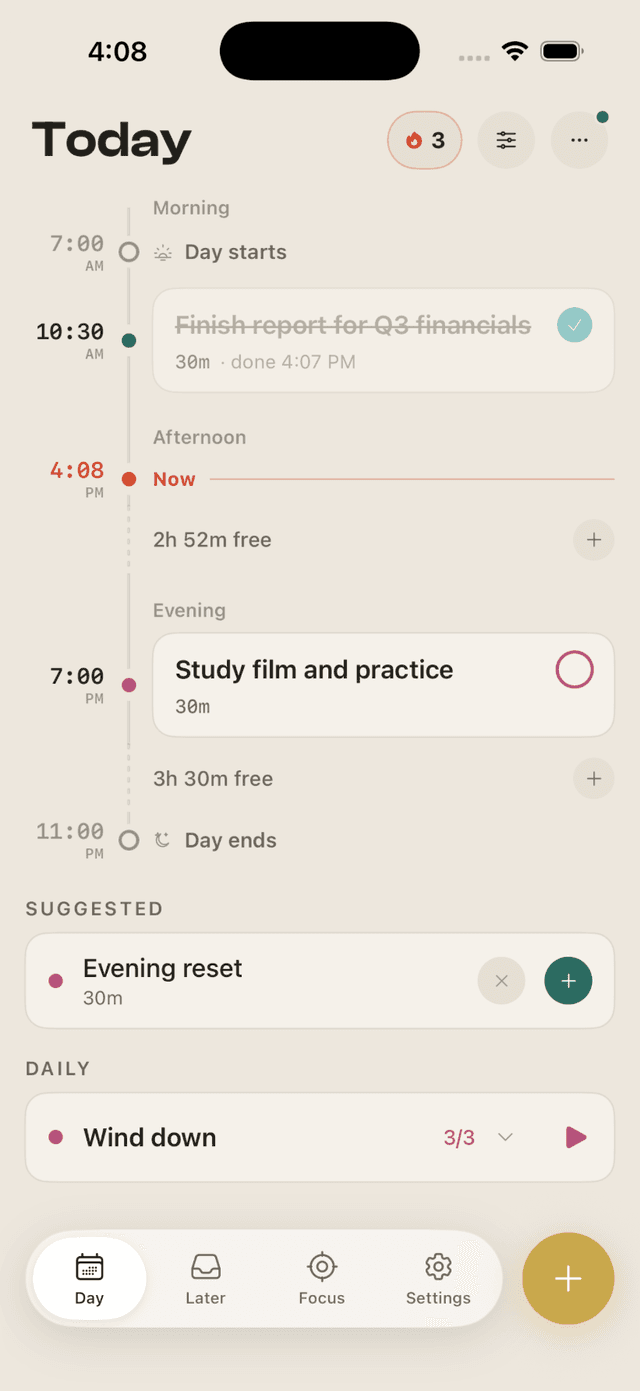
Soltide places what you have committed to along the day itself: morning, afternoon, evening. Your calendar comes in too, so the meetings you cannot move are treated as the obstacles they are and everything else is arranged around them. The free pockets are shown deliberately, because knowing you have two clear hours this afternoon is worth more than another reminder.
The features
Everything it does. You are looking at all of it.
One priority a day. You name the single thing that has to happen, and the schedule is built to protect it rather than bury it.
A morning page and an evening page. Two short rituals at the edges of the day, and nothing to fill in during the middle of it.
A timer that knows your estimate. One task at a time, running against the time you said it would take. Reach zero and it keeps counting rather than telling you off.
Edges you set yourself. Your day starts and ends when you say it does, and nothing is scheduled outside them.
Your Life areas
Most humans do more
than work.
Almost every planner assumes your day is a job with some errands attached. Soltide does not. During setup you name the parts of your life that are actually in your day, and the schedule treats all of them as real.
- Work
- Personal
- Health
- Learning
- Music
- Cooking
There are presets to start from, and you can type your own. Soltide does not decide which of these matters. You do, and you can change your mind whenever you want.
How it holds together
Four rules the app
is built on.
- Setup is measured in minutes, not weekends. You answer a few questions and the first day is already built. Any planning you do after that is because you want to, not because the app stops working without it.
- The day is scheduled for you, and you can overrule it. Auto-scheduling should be a strong first draft, never a cage. Move anything, and the rest reflows.
- Falling behind is expected, so it is designed for. Unfinished work carries forward rather than turning red. There is a streak, and it is built to survive you: any one action keeps it, and taking a break freezes it instead of resetting it to zero.
- Every part of your life gets the same treatment. A guitar practice block and a client call are both real commitments, and the schedule treats them that way.
Questions
The things people
ask first.
When does it launch, and what will it cost?
Neither is decided yet, and we would rather say that than invent a date to look confident. iPhone comes first. Waitlist members hear before anyone else, and some get TestFlight invites before the store listing exists.
Is this just another todo list?
No, and the difference is the timeline. A list will happily hold an unlimited number of open items forever, which is how you reach Friday with sixty of them and no idea which one mattered on Tuesday. In Soltide a task lands in the day at a time, or it waits in Later on purpose.
Do I have to plan everything for it to work?
No. Give it what you have committed to and it will build a day from that. The less you tell it, the more free space it shows you, which is a useful answer in itself.
What happens to a task I do not finish?
It carries forward. Nothing turns red and nothing is deleted behind your back. At the end of the day Soltide asks you what happened to your priority in particular, because moving something on purpose and losing track of it are different things, and only one of them is worth knowing about.

A more organised day,
focused on your priorities.
Join the waitlist and we will tell you the moment it is ready. That is the only email you are signing up for.